
Motileo changelog
Custom Teams in Competitions
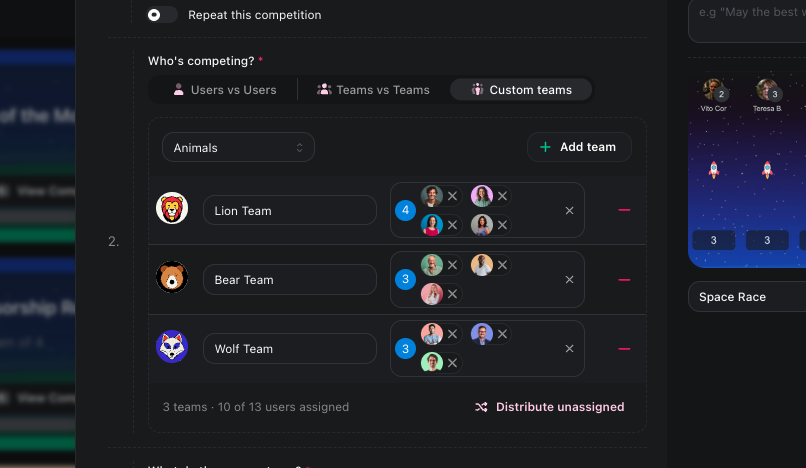
Create teams for a single competition, and nobody's real team or department changes.
Set up the competition teams
Open your competition's Settings. Under Who's competing?, choose Custom Teams and pick a theme: Animals, Football, Space, Fantasy, Nature or Vehicles.
Each click on Add team creates a team with a name and an illustrated avatar, such as Lion Team or Strikers. You can rename it, pick a different illustration or upload your own image.
Add people from the dropdown. Or click Distribute unassigned to spread everyone who is left evenly across the teams.
How it plays
A team's score combines its members' results on any metric, including multi-metric points.
The winning team's coin prize is split among its members.
Team names and avatars appear on the competition page, on competition cards and on TV screens. The leaderboard updates live.
If you move people between teams mid-competition, the scores recalculate straight away. Recurring competitions keep the same teams every round.